

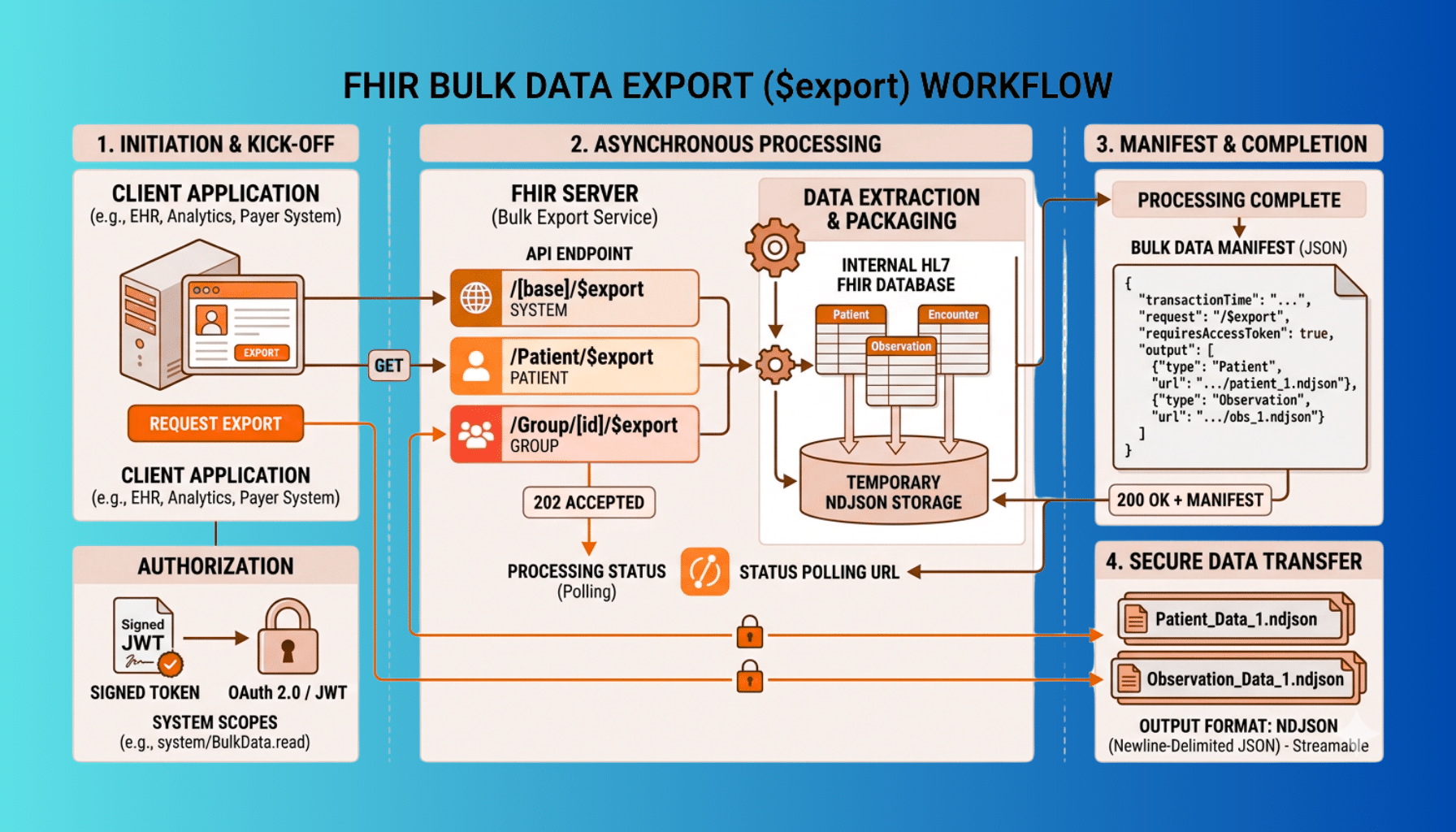
Most FHIR work happens one resource at a time — request a Patient, read an Observation, write an Encounter. But a whole class of healthcare problems needs data in bulk: moving an entire population’s records for analytics, exchanging member data as a payer, supporting population-level interoperability requirements, or feeding a data warehouse. Pulling those volumes one resource at a time through the normal REST API is slow and impractical, and that is exactly the gap FHIR Bulk Data Export — the $export operation, sometimes called “Flat FHIR” — was built to fill. This guide explains how Bulk Data Export works and how to implement it, from the asynchronous request flow to the NDJSON output to the system-to-system authorization it relies on.
This is a focused companion to our general FHIR R4 implementation walkthrough; if you are standing up FHIR from scratch, start there, then come back here when you need bulk export specifically. A scope note: this is a technical guide, and any real data moving through a bulk export is PHI that must be protected with appropriate security and a BAA where applicable.
What FHIR Bulk Data Export Is
FHIR Bulk Data Export is a standardized way (the HL7 FHIR Bulk Data Access specification) to export large volumes of FHIR data in a single, efficient, asynchronous operation rather than resource-by-resource. Instead of returning data inline in a synchronous response, the server packages the requested data into files that the client retrieves once they are ready. The nickname “Flat FHIR” comes from the output format: flat files of newline-delimited JSON. Bulk Data Access is designed precisely for the population-scale and system-to-system scenarios that the normal interactive FHIR API handles poorly, and it has become the backbone of large-volume FHIR data movement in US healthcare.
When You Need It (and When You Don’t)
Bulk export is the right tool for population-level and high-volume data movement: exporting all patients in a group for analytics or population health, payer data exchange and member-data sharing, supporting interoperability requirements that operate at population scale (see our CMS interoperability compliance work), feeding data lakes and warehouses, and research datasets. It is not the right tool for interactive, per-patient app workflows — when a clinician opens one patient’s chart, you use the normal FHIR read and search API, not a bulk export. A simple rule: if you are serving a single user looking at a single patient, use regular FHIR; if you are moving a population’s worth of data between systems, use bulk export.
The Three Export Levels
The $export operation comes in three scopes, and choosing the right one is the first design decision:
- System-level export — $export invoked at the server’s base URL, exporting data across the whole system. The broadest scope, used for full-system data movement where authorized.
- Patient-level export — $export on the Patient compartment (/Patient/$export), exporting data for all patients the client is authorized to access.
- Group-level export — $export on a specific Group (/Group//$export), exporting data for a defined cohort of patients. This is the workhorse for payers, ACOs, and any scenario built around a defined population, because it scopes the export to exactly the group you care about.
Most real-world payer and population-health implementations center on Group-level export against a Group resource that defines the membership.
The Asynchronous Request-and-Poll Flow
The defining characteristic of bulk export is that it is asynchronous — the server cannot produce gigabytes of data in a single synchronous HTTP response, so the spec uses a kick-off, poll, and download pattern. Understanding this flow is the core of implementing a client:
The client kicks off the export with a request to the relevant $export endpoint, including the header Prefer: respond-async to signal it expects an asynchronous operation. The server validates and accepts the request and responds with a 202 Accepted plus a Content-Location header containing a status URL. The client then polls that status URL. While the export is still being assembled, the server returns 202 Accepted (often with progress hints in headers like X-Progress and a Retry-After telling the client how long to wait before polling again). When the export is complete, the status endpoint returns 200 OK with a JSON manifest listing the output files — typically one or more file URLs per resource type, along with the request parameters and a timestamp. Finally, the client downloads each file from the manifest. The client should respect Retry-After and back off politely rather than hammering the status endpoint, and must handle the export taking anywhere from seconds to a long while depending on data volume.
NDJSON Output
Bulk export does not return a normal FHIR Bundle. The output files are NDJSON — newline-delimited JSON, where each line is one complete FHIR resource as a JSON object. The server produces files grouped by resource type (a file of Patient resources, a file of Observation resources, and so on), and large resource types may be split across multiple files. This flat, streamable format is deliberately easy for data pipelines to ingest line by line without loading an entire dataset into memory. When you implement the client side, process NDJSON as a stream — read and handle one line at a time — rather than trying to parse a whole multi-gigabyte file at once.
Filtering the Export: _type and _since
Two parameters keep exports from being needlessly enormous. _type lets the client restrict the export to specific resource types (for example, only Patient, Encounter, and Observation) instead of everything, which is almost always what you want. _since lets the client request only resources changed since a given timestamp, enabling incremental exports — after a full initial export, subsequent jobs pull only what changed, dramatically reducing volume and processing time. Designing around _since for ongoing synchronization, rather than re-exporting everything each time, is one of the biggest practical wins in a bulk-export integration.
Authorization: SMART Backend Services
Bulk export is typically system-to-system, with no interactive user present, so it does not use the interactive SMART on FHIR launch with a user login. Instead it uses SMART Backend Services authorization — a client-credentials style flow where the client authenticates with a signed JWT assertion using an asymmetric key it has pre-registered with the server, and requests system-level scopes (such as system/Patient.read) rather than user- or patient-context scopes. This is a meaningfully different auth model from interactive SMART apps, and getting it right — key registration, JWT assertion, token request, and appropriately scoped access — is a prerequisite for any production bulk-export client. Treat the credentials and exported files with the security the PHI demands, including encryption in transit and at rest.
Implementing a Bulk Export Client
Set Up Backend Services Authorization
Register your client’s public key with the server, and implement the SMART Backend Services flow: build and sign the JWT assertion, request an access token with the appropriate system scopes, and use it on subsequent calls.
Kick Off the Export
Issue the $export request at the right level (system, Patient, or Group) with Prefer: respond-async, using _type to limit resource types and _since for incremental exports. Capture the Content-Location status URL from the 202 response.
Poll the Status Endpoint
Poll the status URL, honoring Retry-After and backing off between polls. Handle the in-progress 202 responses until you receive 200 OK with the output manifest.
Download and Process the NDJSON Files
Download each file listed in the manifest and process the NDJSON as a stream, one resource per line, into your target system or pipeline.
Handle Errors and Completeness
Implement robust handling for failed or expired jobs, partial failures noted in the manifest, and retries, and ensure you have ingested every file completely before treating the dataset as whole.
Common Pitfalls
A few issues catch teams implementing bulk export. Treating it as synchronous — expecting data in the kick-off response instead of implementing the poll-and-download flow — is the most common mistake. Polling too aggressively and ignoring Retry-After can get a client throttled. Loading whole files into memory instead of streaming NDJSON causes failures at real data volumes. Skipping _type/_since leads to exports far larger than necessary. And underestimating the auth setup, since Backend Services with asymmetric keys is more involved than a simple API key. Finally, completeness matters: confirm every file in the manifest has been downloaded and ingested, because a silently missed file means a silently incomplete dataset — which in healthcare can have real consequences.
How Taction Helps
We implement FHIR Bulk Data Export end to end — building bulk-export clients and the SMART Backend Services authorization they require, designing Group-based population exports for payer and population-health use cases, implementing incremental exports with _since, and building the pipelines that ingest NDJSON reliably at volume. We also implement the server side where you need to expose $export from your own FHIR endpoint. With deep FHIR experience, ISO 27001-certified security, and PHI handled under a signed BAA, we make bulk data movement dependable. Our FHIR API development practice, within our healthcare software work, covers the full scope.
Related reading: FHIR R4 Implementation: A Step-by-Step Guide · HL7 to FHIR Integration Tutorial
Frequently Asked Questions
What is FHIR Bulk Data Export?
It is a standardized FHIR operation ($export, defined by the HL7 FHIR Bulk Data Access specification, also called “Flat FHIR”) for exporting large volumes of FHIR data asynchronously as flat NDJSON files, rather than retrieving data one resource at a time through the normal REST API. It is built for population-scale, system-to-system data movement.
When should I use bulk export instead of normal FHIR?
Use bulk export for high-volume, population-level, system-to-system movement — analytics, payer data exchange, population health, data warehousing, research. Use the normal FHIR read and search API for interactive, per-patient workflows, such as a clinician viewing a single chart. Bulk export is the wrong tool for serving one user looking at one patient.
What are the three export levels?
System-level ($export at the base URL, across the whole system), Patient-level (/Patient/$export, all authorized patients), and Group-level (/Group//$export, a defined cohort). Group-level is the workhorse for payers, ACOs, and population-health scenarios built around a defined membership.
How does the asynchronous flow work?
The client kicks off the export with Prefer: respond-async and gets a 202 with a Content-Location status URL. It polls that URL — honoring Retry-After — receiving 202 while the export is assembled, then 200 OK with a manifest of output files when complete. The client then downloads each NDJSON file from the manifest.
What format is the exported data?
NDJSON — newline-delimited JSON, where each line is one complete FHIR resource. Files are grouped by resource type and large types may be split across files. Process it as a stream, one line at a time, rather than loading entire files into memory.
How is bulk export authorized?
Typically with SMART Backend Services — a system-to-system flow using a signed JWT assertion with a pre-registered asymmetric key and system-level scopes (like system/Patient.read), with no interactive user login. This differs from the interactive SMART on FHIR launch, and the credentials and exported files must be protected as the PHI they contain.
Implementing FHIR bulk data export? Schedule a free consultation →
This article is a technical guide, not legal advice. Reviewed by Taction Software’s healthcare engineering team. ISO 27001-certified information security management. Exported FHIR data is PHI, protected under a signed BAA.