
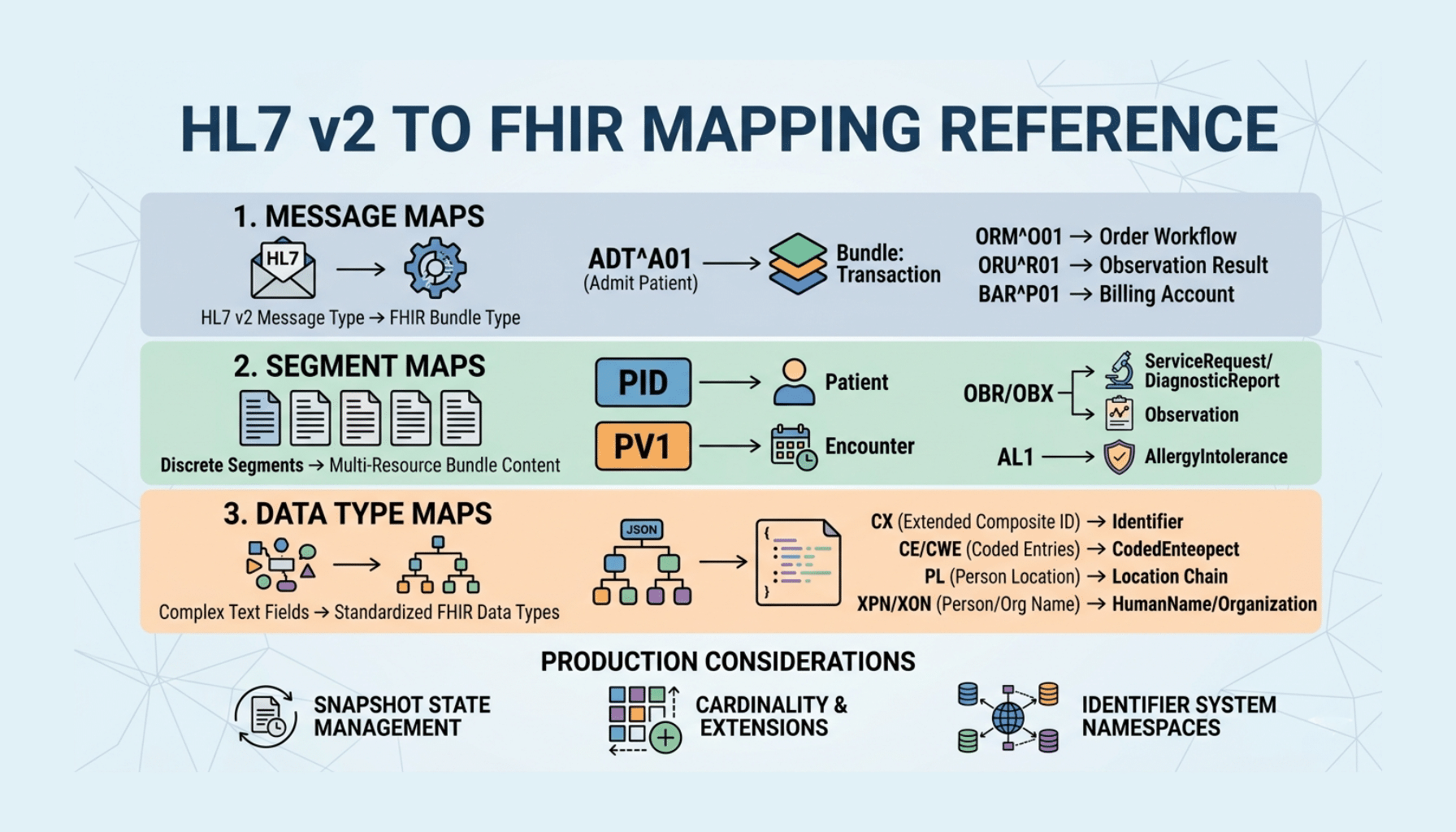
When you bridge HL7 v2 to FHIR, the recurring practical question is simple: this v2 segment — what FHIR resource does it become? This article is a reference for exactly that. It is not an integration tutorial; it is a lookup of how common HL7 v2 segments and message types map to FHIR resources, plus the terminology-mapping reality and the caveats that keep these mappings from being truly one-to-one. Keep it handy while you build.
For the end-to-end “how to integrate HL7 and FHIR” walkthrough, see our HL7 to FHIR integration tutorial; for how the two standards relate conceptually, see our HL7 vs FHIR comparison. This reference assumes that context and focuses on the mappings. A scope note: this is a technical reference, and real data flowing through a mapping is PHI to be protected appropriately.
Build on the Official Mapping Guidance
Before the table: you are not inventing these mappings from scratch. HL7 maintains a v2-to-FHIR mapping implementation guide that provides standardized, community-vetted mappings from v2 segments and fields to FHIR resources and elements. Treat that IG as the authoritative source and this article as an orientation to the common cases. Building on the official guidance is far more reliable than ad hoc mapping, and it keeps your work aligned with how the rest of the ecosystem does it.
Common Segment-to-Resource Mappings
The table below summarizes how frequently encountered v2 segments commonly map to FHIR resources. Exact element-level mappings come from the v2-to-FHIR IG; this is the segment-level orientation.
| HL7 v2 segment | Carries | Common FHIR resource |
| MSH (Message Header) | Message metadata, sender/receiver | MessageHeader (+ Bundle metadata) |
| PID (Patient Identification) | Patient demographics, identifiers | Patient |
| PD1 (Additional Demographics) | Additional patient detail | Patient (extensions) |
| NK1 (Next of Kin) | Relatives, contacts | RelatedPerson / Patient.contact |
| PV1 (Patient Visit) | Visit/encounter details | Encounter |
| PV2 (Patient Visit – Additional) | Additional visit detail | Encounter (additional) |
| AL1 (Allergy) | Allergy information | AllergyIntolerance |
| DG1 (Diagnosis) | Diagnoses | Condition |
| PRB (Problem) | Problem list entries | Condition |
| OBR (Observation Request) | Order/report grouping | ServiceRequest / DiagnosticReport |
| OBX (Observation/Result) | Observation values, results | Observation |
| ORC (Common Order) | Order common information | ServiceRequest |
| RXE / RXO (Pharmacy/Treatment) | Medication orders | MedicationRequest |
| RXA (Pharmacy Administration) | Administered medications/vaccines | Immunization / MedicationAdministration |
| IN1 / IN2 (Insurance) | Coverage information | Coverage |
| GT1 (Guarantor) | Guarantor | RelatedPerson / Account guarantor |
| SCH (Scheduling) | Appointment details | Appointment |
These are the workhorses. The clinically central ones to internalize are PID to Patient, PV1 to Encounter, OBX to Observation (often grouped into a DiagnosticReport via OBR), order messages to ServiceRequest, and AL1 to AllergyIntolerance — they cover a large share of real-world traffic.
Message Type to Resource Patterns
It also helps to think one level up, at the message-type level, since a v2 message usually produces a small set of related FHIR resources:
- ADT (admit/discharge/transfer) → primarily Patient and Encounter resources, plus related demographics.
- ORU (observation result) → a DiagnosticReport containing Observation resources.
- ORM / OMG (orders) → ServiceRequest resources.
- VXU (vaccination) → Immunization resources.
- SIU (scheduling) → Appointment resources.
- DFT (financial) → financial resources such as Account/ChargeItem depending on use.
Mapping at the message level frames what bundle of resources a given inbound message should yield, which is how you typically structure a translation.
Terminology Mapping: The Other Half
Mapping the structure is only half the job — the codes have to map too. HL7 v2 uses its own tables and code sets, while FHIR binds elements to value sets built on standard terminologies such as LOINC (labs and observations), SNOMED CT (clinical concepts), and RxNorm (medications), along with FHIR’s own code systems for things like statuses and administrative gender. A correct mapping translates v2 coded values into the appropriate FHIR codes and value sets rather than passing raw v2 codes into FHIR resources, where they will not be understood. Weak terminology mapping is a leading cause of bridges that move data but produce FHIR resources that do not actually interoperate, so give it the same attention as the structural mapping.
Caveats: These Mappings Are Not One-to-One
Treat this reference as a starting point, not a guarantee of clean conversion, because v2 and FHIR are structured differently and several realities complicate the mapping. v2 messages frequently include Z-segments — site-specific custom segments — that have no standard FHIR equivalent and require deliberate decisions. Some v2 fields are ambiguous or overloaded, and some semantics are lossy in translation. The same v2 concept can map to different FHIR resources depending on context. And local customizations mean two systems’ “standard” v2 rarely match exactly. The practical implications: rely on the v2-to-FHIR IG for element-level detail, make considered decisions (and use extensions) where things do not map cleanly, and validate the resulting FHIR against the relevant profiles — US Core for US interoperability — to confirm the output is conformant rather than merely well-formed. A mapping that silently drops clinically meaningful data is a safety concern, not just a data-quality one.
How Taction Helps
We build HL7 v2 to FHIR translation that maps segments to resources correctly — grounded in the official v2-to-FHIR guidance, with proper terminology mapping to LOINC, SNOMED CT, and RxNorm, deliberate handling of Z-segments and lossy cases, and validation of the FHIR output against US Core. We implement these mappings in interface engines like Mirth Connect and run v2 and FHIR in coexistence where that fits. With deep experience in both standards, ISO 27001-certified security, and PHI handled under a signed BAA, we make the mapping reliable. Our HL7 integration and FHIR API development practices, within our healthcare software work, cover the full scope.
Related reading: HL7 to FHIR Integration Tutorial · HL7 vs FHIR: A Complete Comparison
Frequently Asked Questions
Is there an official HL7 v2 to FHIR mapping?
Yes. HL7 maintains a v2-to-FHIR mapping implementation guide that provides standardized, community-vetted mappings from v2 segments and fields to FHIR resources and elements. Treat it as the authoritative source for element-level detail; a reference like this gives the segment-level orientation, but the IG is what you build against.
What does PID map to in FHIR?
The PID (Patient Identification) segment, which carries patient demographics and identifiers, maps to the FHIR Patient resource. It is one of the most fundamental mappings, since patient identity underpins almost everything else in both v2 messaging and FHIR.
How do lab results (OBX) map to FHIR?
OBX (observation/result) segments map to FHIR Observation resources, and they are typically grouped — via the OBR order/report segment — into a DiagnosticReport that references the individual Observations. So a results message yields a DiagnosticReport containing multiple Observation resources.
Do I need to map terminologies too?
Yes. Mapping structure is only half the job; v2 codes from its own tables must be translated to the FHIR value sets and standard terminologies (LOINC, SNOMED CT, RxNorm, and FHIR code systems). Passing raw v2 codes into FHIR resources produces data that does not actually interoperate, so terminology mapping deserves the same care as structural mapping.
Are v2-to-FHIR mappings always one-to-one?
No. v2 and FHIR are structured differently, v2 messages include site-specific Z-segments with no FHIR equivalent, some fields are ambiguous or lossy, and the same concept can map to different resources by context. Use the v2-to-FHIR IG, make deliberate decisions (including extensions) where mappings are imperfect, and validate the output against US Core.
How do I know my mapping is correct?
Validate the resulting FHIR resources against the relevant profiles — US Core for US interoperability — to confirm they are conformant, and reconcile them against the source v2 to confirm the clinical content was preserved. Validating continuously catches mapping and terminology errors before they reach the systems consuming the FHIR data.
Mapping HL7 v2 to FHIR? Schedule a free consultation →
This article is a technical reference, not legal advice. Reviewed by Taction Software’s healthcare integration engineering team. ISO 27001-certified information security management. Data flowing through a v2-to-FHIR mapping is PHI, protected under a signed BAA.