
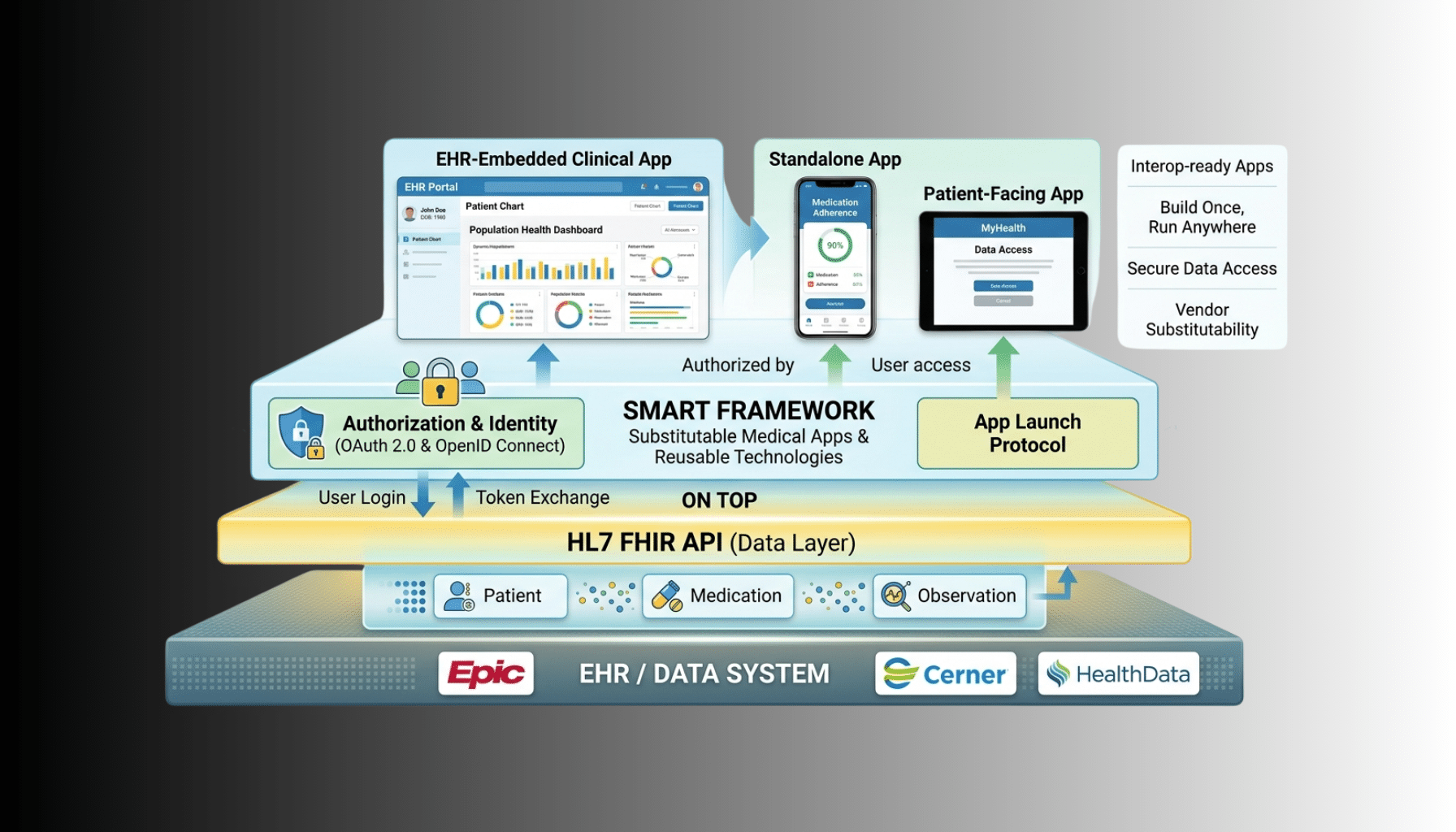
When you build a SMART on FHIR app, one of the first architectural decisions is how it launches — and there are two distinct models that behave very differently. EHR launch starts your app from inside the EHR, with a patient already in context. Standalone launch starts your app on its own, with the user signing in and context established from scratch. Getting this distinction right shapes your authorization flow, your scopes, and your whole user experience, and it is one of the most common sources of confusion for teams new to SMART. This guide explains both launch types, the OAuth2 flow underneath them, and how to choose.
This is a focused companion to our general SMART on FHIR app development tutorial and our SMART on FHIR app development practice; if you want the end-to-end build walkthrough, start there, then use this to get launch contexts right. A scope note: this is a technical guide, and any real data your app touches is PHI to be protected appropriately.
SMART on FHIR in One Paragraph
SMART on FHIR is the standard that lets third-party apps integrate with EHRs in a consistent, secure way: it uses OAuth2 for authorization and FHIR for data access, so an app written once can run against any compliant EHR. The “launch” is how the app obtains authorization and context — which patient, which user, which permissions — and that is where EHR launch and standalone launch diverge. Both end with your app holding an access token scoped to specific FHIR resources; they differ in how the app gets there. For the underlying FHIR work, see our FHIR API development practice.
EHR Launch: Launching From Inside the EHR
In an EHR launch, a clinician is already working in the EHR with a patient’s chart open, and they launch your app from within that context — a button or menu inside the EHR. Because the EHR already knows the patient and the user, it hands that context to your app. Mechanically, the EHR opens your app’s launch URL with two parameters: an opaque launch token and the iss (the FHIR server’s base URL). Your app takes that launch token into the OAuth2 authorization request, and the EHR’s authorization server uses it to associate the session with the right patient and encounter. The result is a seamless experience: the clinician clicks your app and it opens already focused on the patient they were viewing, with no separate login or patient selection. EHR launch is the model for apps that live inside the clinical workflow — clinician-facing tools embedded in the EHR.
Standalone Launch: Launching On Its Own
In a standalone launch, your app starts independently — the user opens it directly, not from inside the EHR. There is no launch parameter handed over, because there is no EHR session providing context. Instead, your app initiates the OAuth2 flow on its own, the user authenticates with the EHR’s authorization server, and your app requests the context it needs — commonly asking for a patient context, which the EHR may resolve through a patient picker where the user selects the patient. Standalone launch is the model for apps that run outside the EHR’s embedded workflow — patient-facing apps, or provider apps used independently of an open chart. The app is responsible for establishing context itself rather than receiving it.
The OAuth2 Authorization Flow
Both launch types use the same underlying OAuth2 authorization code flow; the launch type mainly changes how it begins. The sequence is:
Your app discovers the EHR’s authorization and token endpoints — typically from the FHIR server’s .well-known/smart-configuration document. It then redirects the user to the authorization endpoint with the standard parameters: client_id, redirect_uri, scope, state, and aud set to the FHIR base URL — plus, for an EHR launch, the launch token received from the EHR. The user authenticates and authorizes at the EHR’s authorization server (for EHR launch this may be transparent since they are already signed in; for standalone they log in). The authorization server redirects back to your redirect_uri with an authorization code. Your app exchanges that code at the token endpoint for an access token. The token response carries the access token and, where applicable, launch context such as the patient id (and possibly encounter), which tells your app which patient it is authorized to work with. From there your app calls the FHIR API with the access token.
Modern SMART (v2) expects PKCE on the authorization code flow for added security, and you should use it. Whether your app is a public client (like a browser-based app) or a confidential client (a server-side app holding a secret) also affects how you handle the token exchange.
Scopes: Launch and Patient Context
SMART scopes control what your app can do and what context it gets. A few are central to launch:
- launch — used in EHR launch, signals that the app is launching with EHR-provided context (paired with the launch parameter).
- launch/patient — used in standalone launch, requests a patient context, prompting the EHR to establish which patient (often via a patient picker).
- launch/encounter — requests encounter context where needed.
- openid and fhirUser — identify the logged-in user.
- offline_access — requests a refresh token for longer-lived access.
- Resource scopes — what FHIR data the app may access, in the form patient/Observation.read (patient-context data), user/Patient.read (data the user can see), or wildcards like patient/*.read. SMART v2 uses a refined scope syntax (for example patient/Observation.rs for read/search) alongside the older v1 .read/.write style.
The key launch-related distinction: EHR launch uses the launch scope with the launch parameter to receive context, while standalone launch uses launch/patient (and similar) to request context the app does not otherwise have.
How to Choose Between Them
The choice follows your app’s role. Choose EHR launch when your app is a clinician-facing tool meant to live inside the clinical workflow — opened from within a patient’s chart, used in the flow of care, where seamless in-context launch matters. Choose standalone launch when your app runs independently of an open EHR session — patient-facing apps, or provider apps used outside the chart — where the app must establish its own context. Many products ultimately support both, offering EHR launch for embedded clinical use and standalone launch for independent access, since the two serve genuinely different scenarios. Decide based on where and how your users will actually open the app.
How Taction Helps
We build SMART on FHIR apps and get the launch model right for your use case — implementing EHR launch for embedded clinical tools, standalone launch for independent and patient-facing apps, or both, along with the OAuth2 authorization code flow, PKCE, scope design, and launch-context handling. We integrate against the major EHRs’ SMART implementations and handle the differences between them. With deep FHIR and SMART experience, ISO 27001-certified security, and PHI handled under a signed BAA, we make the integration solid. Our SMART on FHIR and FHIR API development practices, within our healthcare software work, cover the full scope.
Related reading: SMART on FHIR App Development Tutorial · FHIR R4 Implementation: A Step-by-Step Guide
Frequently Asked Questions
What’s the difference between EHR launch and standalone launch?
EHR launch starts your app from inside the EHR with a patient already in context — the EHR passes a launch token and the FHIR server URL, so the app opens focused on the current patient. Standalone launch starts your app independently, with the user logging in and the app requesting context itself (often selecting a patient via a picker). EHR launch receives context; standalone establishes it.
When should I use EHR launch?
For clinician-facing apps that live inside the clinical workflow — launched from within a patient’s chart and used in the flow of care. EHR launch gives a seamless experience where the app opens already focused on the patient the clinician was viewing, with no separate login or patient selection.
When should I use standalone launch?
For apps that run independently of an open EHR session — patient-facing apps, or provider apps used outside the chart. There is no EHR-provided context, so the app initiates the OAuth2 flow itself and requests the context it needs, such as a patient context resolved through a patient picker.
What does the launch parameter do?
In an EHR launch, the EHR opens your app’s launch URL with an opaque launch token and the iss (FHIR base URL). Your app passes the launch token into the OAuth2 authorization request, and the EHR’s authorization server uses it to bind the session to the correct patient and encounter context.
Which SMART scopes relate to launch context?
launch (EHR launch, with the launch parameter), launch/patient and launch/encounter (standalone, to request context), openid and fhirUser (identify the user), offline_access (refresh token), and resource scopes like patient/Observation.read or user/Patient.read that control which FHIR data the app may access.
Do both launch types use the same OAuth2 flow?
Yes — both use the OAuth2 authorization code flow (with PKCE in SMART v2). The launch type mainly changes how the flow begins: EHR launch includes the launch token from the EHR, while standalone launch starts fresh and requests context via scopes. Both end with an access token and any applicable launch context in the token response.
Building a SMART on FHIR app? Schedule a free consultation →
This article is a technical guide, not legal advice. Reviewed by Taction Software’s healthcare engineering team. ISO 27001-certified information security management. PHI accessed by a SMART app is protected under a signed BAA.