
Building a Mirth Connect channel that works on a good day is the easy part. Building one that holds up when a downstream system goes offline, a message arrives malformed, or a transformation throws an error — that is what separates a demo from a production integration. In healthcare, where a dropped message can mean a missing lab result or an unprocessed order, error handling and reprocessing are not afterthoughts; they are core reliability features. This guide focuses specifically on making Mirth Connect (NextGen Connect) integrations resilient: how errors surface, how to retry and reprocess, how to get alerted, and how to handle errors in code.
This is an operational companion to building channels generally; for the broader Mirth integration practice, see our Mirth Connect integration page. A scope note: this is a technical guide, and messages flowing through Mirth carry PHI to be protected appropriately.
Understand Message States First
Reliable error handling starts with understanding the states a message moves through in Mirth. As a message is processed, it carries a status — received, filtered, transformed, queued, sent, pending, or error — reflecting where it is in the pipeline and whether anything went wrong. The dashboard and message browser surface these states, letting you see at a glance how many messages errored, how many are queued, and how many sent successfully. Knowing what each state means is the foundation, because effective error handling is largely about noticing messages that did not reach a successful “sent” state and doing something deliberate about them rather than letting them sit silently.
Where Errors Happen and How They Surface
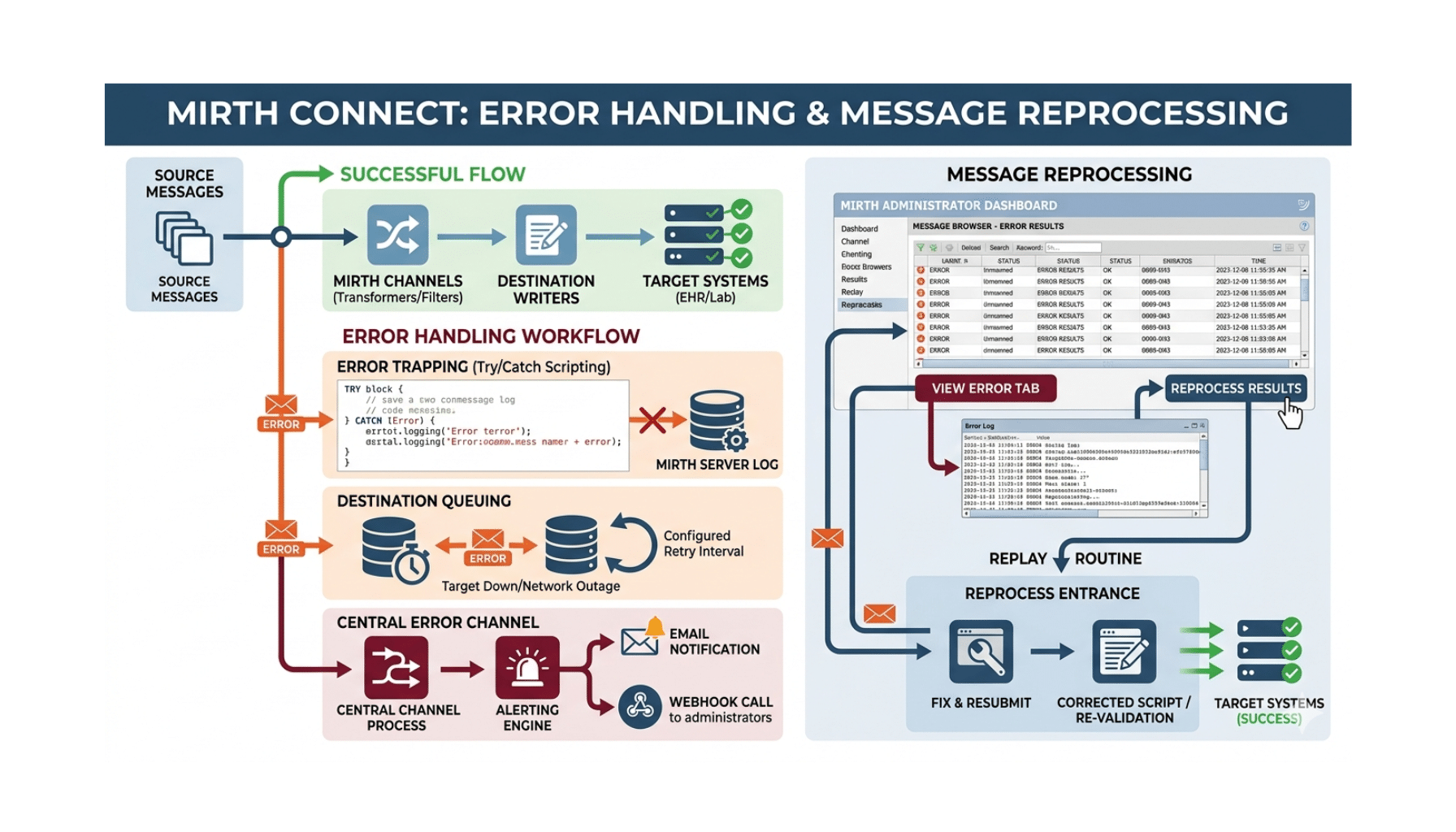
Errors can occur at different points: a source error (a malformed inbound message that can’t be parsed), a transformer error (a transformation throws), or a destination error (the downstream system rejects the message or is unreachable). Mirth records these — the message browser is the key tool, letting you open an individual message, see its content at each processing step, and read the error that occurred. This step-by-step visibility is one of Mirth’s real strengths: when something fails, you can see exactly what arrived, how far it got, how it was transformed, and where it broke, rather than guessing. Diagnosing production issues in Mirth is concrete because the engine keeps this detail — provided you haven’t disabled message storage (more on that below).
Destination Queuing: Retrying Automatically
A frequent failure mode is a downstream system being temporarily unavailable. Mirth’s destination queuing is the answer: with queuing enabled on a destination, messages that can’t be delivered are held in a queue and retried automatically rather than simply failing. You can configure retry behavior — how often to retry and how many times — so that a brief downstream outage is ridden out without losing messages or requiring manual intervention. Queuing is one of the most important reliability settings in Mirth, and for any destination talking to a system that might be down (which is most of them), it should usually be enabled and tuned to your tolerance. The alternative — messages failing the instant a downstream blip occurs — is fragile.
Reprocessing Messages
When messages do end up in an error state — because a downstream system was down longer than the retry window, or a bug was fixed and you need to re-run affected messages — Mirth lets you reprocess them from the message browser or dashboard. You can reprocess individual messages or do bulk reprocessing across a set, and you can typically choose to reprocess using the original received message or the current channel logic. This is enormously valuable operationally: a downstream system comes back after an outage, you reprocess the messages that errored during it, and the gap is filled. Reprocessing depends on the messages still being stored, which is why message storage settings directly affect your recovery options.
Alerts: Knowing When Something Breaks
Silent failures are the dangerous ones. Mirth’s alerts let you be notified when errors occur — configuring an alert to trigger on error events and send a notification (such as email) so the right people know promptly rather than discovering a problem hours later when someone asks where their data is. For production healthcare integrations, error alerting is essential operational hygiene: an unmonitored channel that has been silently erroring is a liability. Configure alerts so that errors surface to a human quickly, and treat alert noise seriously enough to keep alerts meaningful.
Error Handling in Channel Code
Beyond the engine’s built-in mechanisms, robust channels handle errors in their JavaScript. Wrapping transformer logic in try/catch lets you handle anticipated failures gracefully instead of letting an unhandled exception fail the message opaquely. You can use the response and the response map to set message status and convey outcomes, and a postprocessor script can take action after processing. For HL7 v2 over MLLP, this includes returning the appropriate acknowledgment — a negative acknowledgment (NACK) when processing fails — so the sender knows the outcome rather than assuming success. Thoughtful in-code error handling turns vague failures into clear, actionable ones, and it is where a lot of real-world Mirth reliability is won or lost.
Don’t Disable the Storage You Need
A subtle but important point: Mirth’s message storage settings control how much of each message is retained, and they directly determine what you can do after the fact. Aggressive storage reduction (storing less, or pruning quickly) saves space but can leave you unable to inspect or reprocess messages later — exactly when you need them most, during an incident. Balance storage settings against your operational needs: store enough, for long enough, to support the troubleshooting and reprocessing your reliability strategy depends on, and prune deliberately rather than by default. Discovering during an outage that you can’t reprocess because the messages weren’t retained is a painful, avoidable lesson.
A Reliability and Recovery Workflow
Enable and Tune Destination Queuing
Turn on queuing for destinations talking to systems that might be unavailable, and configure retry frequency and counts to your tolerance.
Configure Error Alerts
Set up alerts on error events so the right people are notified promptly when something breaks.
Handle Errors in Code
Use try/catch in transformers, set status via the response map, and return proper acknowledgments (including NACKs on failure) for HL7 over MLLP.
Set Message Storage to Support Recovery
Retain enough message detail, for long enough, to support inspection and reprocessing; prune deliberately, not by default.
Monitor the Dashboard and Message Browser
Watch channel states and statistics, and use the message browser to diagnose errored messages step by step.
Reprocess After Resolution
Once a downstream issue or bug is resolved, reprocess the affected messages — individually or in bulk — to fill the gap.
How Taction Helps
We build and operate Mirth Connect (NextGen Connect) integrations for reliability — configuring destination queuing and retries, setting up error alerting, handling errors deliberately in JavaScript with proper acknowledgments, tuning message storage to support recovery, and establishing monitoring and reprocessing workflows so outages and errors are recoverable rather than data-losing. We treat error handling as a core feature, not an afterthought. With deep integration-engine experience, ISO 27001-certified security, and PHI handled under a signed BAA, we keep your interfaces dependable. Our Mirth Connect integration and HL7 integration practices, within our healthcare software work, cover the full scope. For choosing an integration approach, see our Mirth vs Redox comparison.
Related reading: Mirth Connect Integration Services · Using LLMs to Auto-Generate Mirth Channels
Frequently Asked Questions
What message states does Mirth track?
As a message is processed it carries a status — received, filtered, transformed, queued, sent, pending, or error — reflecting where it is in the pipeline and whether anything went wrong. The dashboard and message browser surface these, so you can see how many messages errored, queued, or sent successfully. Understanding these states is the foundation of error handling.
How does Mirth handle a downstream system being down?
Through destination queuing. With queuing enabled, messages that can’t be delivered are held and retried automatically, with configurable retry frequency and counts, so a brief outage is ridden out without losing messages or manual intervention. For any destination talking to a system that might be down, queuing should usually be enabled and tuned.
Can I reprocess messages that failed?
Yes. Mirth lets you reprocess errored messages from the message browser or dashboard, individually or in bulk, and typically lets you reprocess using the original message or current channel logic. This is how you fill gaps after a downstream outage or a fixed bug — but it depends on the messages still being stored.
How do I get notified when a channel errors?
Configure Mirth alerts to trigger on error events and send a notification such as email, so the right people know promptly rather than discovering the problem hours later. For production healthcare integrations, error alerting is essential — an unmonitored channel silently erroring is a liability.
How should I handle errors in channel code?
Wrap transformer logic in try/catch to handle anticipated failures gracefully, use the response map to set message status, and for HL7 v2 over MLLP return the appropriate acknowledgment — a NACK when processing fails — so the sender knows the outcome. Thoughtful in-code handling turns opaque failures into clear, actionable ones.
Why do message storage settings matter for error handling?
Storage settings control how much of each message is retained, which determines what you can inspect and reprocess later. Aggressive storage reduction saves space but can leave you unable to reprocess messages during an incident — exactly when you need them. Store enough, for long enough, to support your troubleshooting and recovery needs.
Making your Mirth integrations reliable? Schedule a free consultation →
This article is a technical guide, not legal advice. Reviewed by Taction Software’s healthcare integration engineering team. ISO 27001-certified information security management. Messages in Mirth channels carry PHI, protected under a signed BAA.